
Training Plans
Create goal-driven training plans, manage periodized blocks, and adapt your schedule with AI in Coach Watts.
Coach Watts builds dynamic, goal-driven training plans that adapt when life gets in the way. Unlike static PDF plans, your schedule updates based on recovery, missed sessions, and performance trends.
How plans work
Training plans follow a periodization hierarchy:
| Level | Name | Example |
|---|---|---|
| Macrocycle | Full plan | 12-week build to a century ride |
| Mesocycle | Training block | 4-week sweet spot block |
| Microcycle | Training week | Week 3: 320 TSS target |
| Session | Planned workout | Tuesday: 60min tempo intervals |
Open Training Plan from the sidebar to view your active plan.
Creating a plan
Use the Plan Wizard to generate a new plan:
- Select or create a goal — race, fitness milestone, or event date
- Profile the event — distance, elevation, terrain, priority
- Set availability — training days and time slots (from Profile settings)
- Choose strategy — linear, polarized, or pyramidal intensity distribution
- Set volume preference — low, moderate, or high weekly hours
- Preview block structure — review mesocycles before activating
Your availability and threshold values directly affect plan quality. Complete Account & Profile Setup before generating a plan.
Plan dashboard
The active plan view shows:
- Timeline — horizontal progression through training blocks
- Week overview — TSS and volume targets for the selected week
- Workout list — planned sessions with completion status
- Compliance — how closely completed workouts match the plan
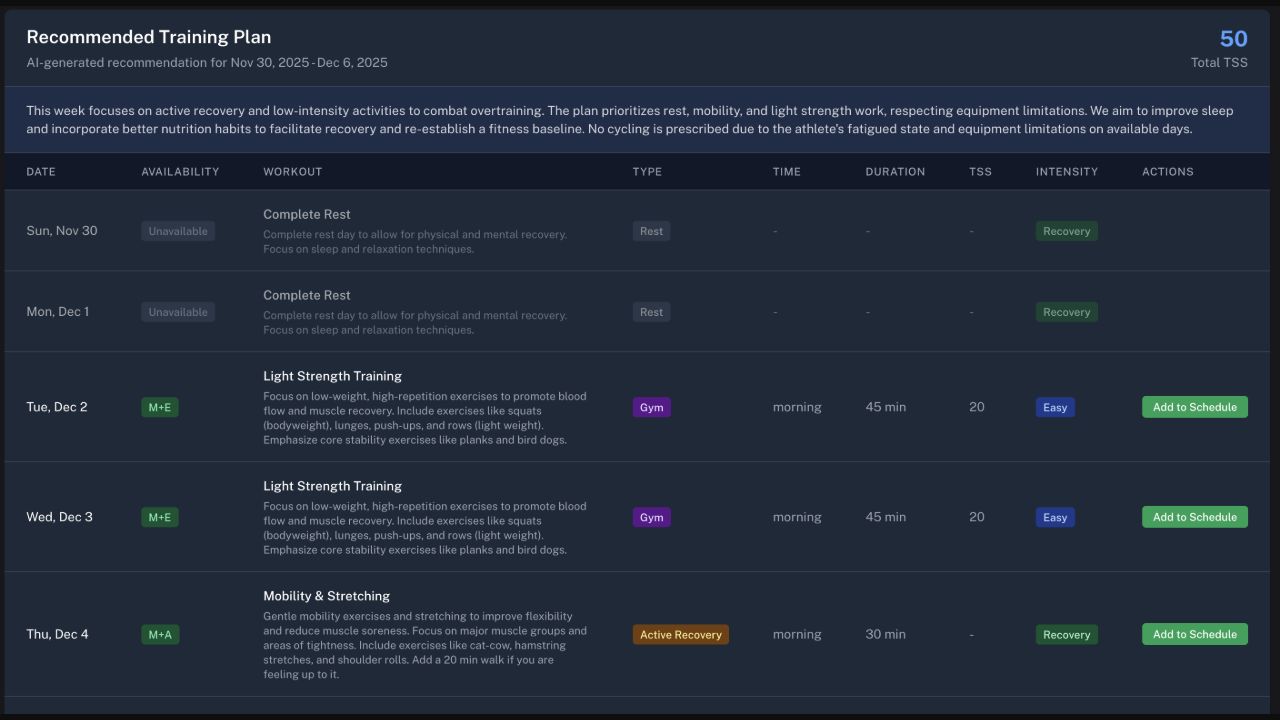
The weekly table makes it easy to review the load and intent of every session before adding it to your schedule.
Planned vs. completed workouts
When you finish a synced activity, Coach Watts attempts to match it to a planned workout. Unmatched sessions appear in the workout matcher for manual linking.
Matching affects:
- Plan compliance metrics
- Block progression decisions
- AI adaptation recommendations
Adapting your plan
Life happens. Use the Adaptation Wizard or ask Chat to adjust:
- Push forward — shift remaining workouts after a missed week
- Recalculate — reduce intensity based on fatigue signals
- Mark sick — insert rest days and adjust the return-to-training ramp
- Swap sessions — exchange today's workout for something easier
Example Chat prompts:
- "I missed three days — can we push my plan forward?"
- "I'm sick today. Adjust the rest of this week."
- "Make this block 10% easier based on my recent HRV."
Sharing plans
Share your plan with a coach or training partner:
- Open Training Plan
- Click Share
- Copy the link or send it directly
Connected coaches can review your schedule and manage supported planned-workout actions through permission-checked coach views and the coaching calendar.
Library plans
Browse pre-built templates at Library → Plans. Coaches can assign library plans to athletes from the Coach Library guide.